Home Assistant MQTT bridge
Run a small bridge process: it publishes MQTT Discovery entities to Home Assistant and forwards commands over LAN (Lovense Remote Game Mode) or direct BLE (this machine’s Bluetooth radio to LVS-… peripherals).
Requirements
- MQTT broker reachable from the machine running the bridge (for example Mosquitto on
192.168.1.2:1883) - Home Assistant MQTT integration using the same broker
- LAN mode: Lovense Remote with Game Mode enabled (not Lovense Connect for Toy Events)
- BLE mode: Bluetooth adapter on the host running the bridge; toys must be connectable from the OS (often exclusive with Lovense Remote’s BLE link). Install
pip install 'lovensepy[mqtt,ble]'(or[mqtt]+[ble]). pip install 'lovensepy[mqtt]'(addblefor BLE transport)
Home Assistant with BLE (full setup)
BLE uses Bleak and your OS Bluetooth stack. The bridge process must run natively on a machine that has a working Bluetooth adapter (laptop, Raspberry Pi, mini PC, etc.). Do not run the BLE bridge inside the stock Docker bridge image—containers usually cannot access Bluetooth.
You can still run Home Assistant and Mosquitto in Docker (or elsewhere), as long as the MQTT broker is reachable from that host. Typical layout:
| Component | Where it runs |
|---|---|
| Mosquitto | Docker or OS package (port 1883 reachable from the bridge host) |
| Home Assistant | Docker, HA OS, or supervised—MQTT integration points at the same broker |
LovensePy HAMqttBridge |
On the host with transport="ble", pip install 'lovensepy[mqtt,ble]' |
A) Docker Compose for HA + Mosquitto only, bridge on the host (BLE)
From the repository root (Compose ships Mosquitto + Home Assistant; the bridge always runs on the host):
(You can still run docker compose up -d mqtt homeassistant—same two services.)
Expose the broker on the host (default MQTT_PUBLISH_PORT=1883 in .env.example). On the same machine, install the bridge and point it at localhost:
# Python 3.12+ recommended
python -m venv .venv
source .venv/bin/activate   # Windows: .venv\Scripts\activate
pip install 'lovensepy[mqtt,ble]'

export LOVENSE_TRANSPORT=ble
export MQTT_HOST=127.0.0.1
export MQTT_PORT=1883
# optional: LOVENSE_BLE_DISCOVER_TIMEOUT, LOVENSE_BLE_NAME_PREFIX, MQTT_TOPIC_PREFIX

python -m lovensepy.services.mqtt_bridge
In Home Assistant, add the MQTT integration: Settings → Devices & services → Add integration → MQTT — broker mqtt, port 1883, no TLS (matches compose/mosquitto.conf). Home Assistant and Mosquitto share the Compose network; the host bridge uses 127.0.0.1 to reach the published port.
If Home Assistant or the broker runs on another machine, set MQTT_HOST to that broker’s LAN IP (and firewall rules) instead of 127.0.0.1.
B) No Docker: broker + HA + bridge on one PC
Install Mosquitto and Home Assistant using your OS or official Home Assistant install methods. Install lovensepy[mqtt,ble], set LOVENSE_TRANSPORT=ble and MQTT_HOST to your broker address, then run python -m lovensepy.services.mqtt_bridge (or lovensepy-mqtt). The integration steps are the same: one MQTT broker, HA MQTT integration, bridge publishing Discovery to that broker.
Bluetooth and device access
- macOS: Grant Bluetooth permission for the terminal app or IDE running Python (System Settings → Privacy & Security → Bluetooth).
- Linux: User often needs membership in the
bluetoothgroup and a running BlueZ stack; some distributions requirebluetoothctlpower on. - Windows: Bleak supports WinRT Bluetooth; run from a normal user session with Bluetooth enabled.
Lovense Remote vs BLE
Many toys accept only one BLE central at a time. If Lovense Remote on a phone is connected over Bluetooth, the PC bridge may fail to connect—disconnect the toy in Remote or use LAN mode for the bridge instead.
Toy Events
Toy Events (live battery/strength over WebSocket) apply to LAN mode when enabled. BLE mode does not use Toy Events; battery/state updates come from polling via get_toys on the refresh interval.
Step 1: Environment variables
LAN (default):
export LOVENSE_TRANSPORT=lan          # default; omit or set explicitly
export LOVENSE_LAN_IP=192.168.1.100   # host running Lovense Remote (Game Mode)
export MQTT_HOST=192.168.1.2
export MQTT_PORT=1883
# optional: MQTT_USER, MQTT_PASSWORD, MQTT_TOPIC_PREFIX=lovensepy
BLE:
export LOVENSE_TRANSPORT=ble
# LOVENSE_LAN_IP not required; Toy Events are not used in BLE mode
export MQTT_HOST=192.168.1.2
# optional: LOVENSE_BLE_DISCOVER_TIMEOUT (seconds, default 15), LOVENSE_BLE_NAME_PREFIX (default LVS-)
Step 2: Run the bridge service
Equivalent: lovensepy-mqtt after pip install 'lovensepy[mqtt]'. The file examples/ha_mqtt_bridge.py is a thin shim to the same entrypoint.
Step 3: Home Assistant
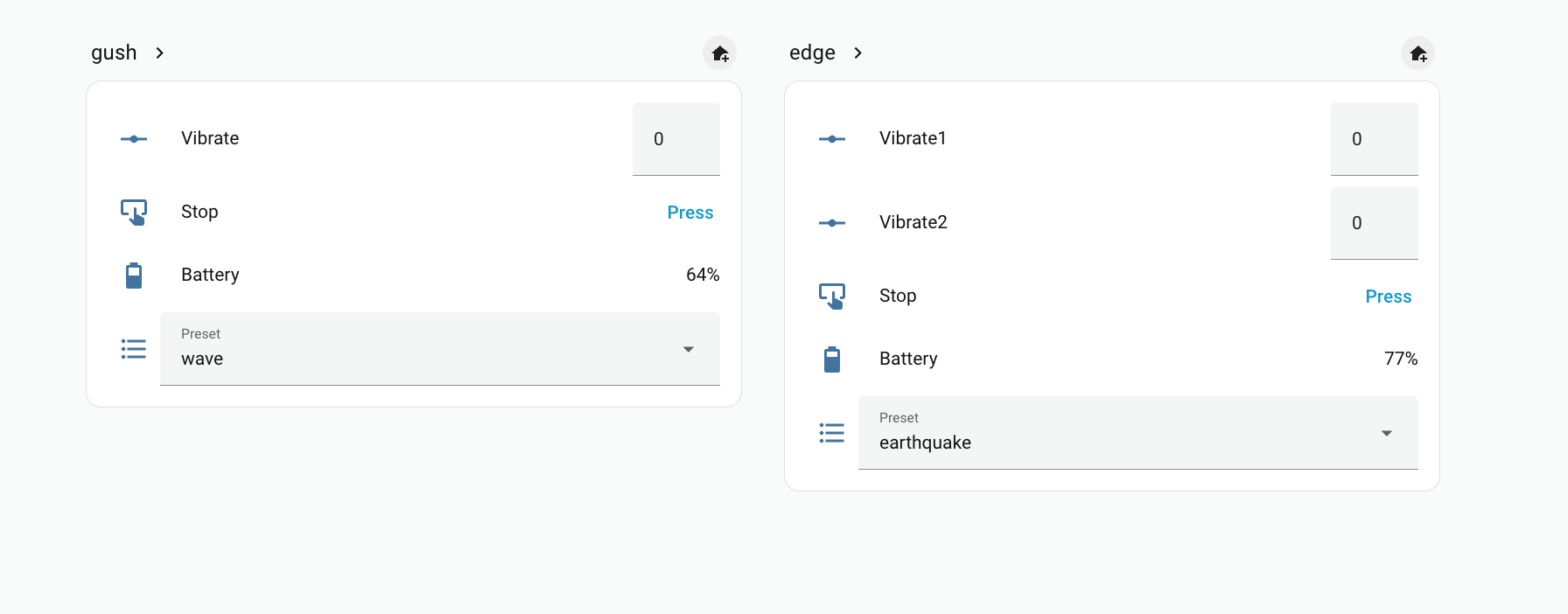
In Home Assistant, open Settings, then Devices & Services, then MQTT. New devices should appear under MQTT discovery (per-toy controls for supported motors, Stop, Preset, Battery, and similar).
Step 4: Toy Events permission (LAN only)
If you use LAN mode and want Toy Events, grant access when Lovense Remote prompts (same flow as the Toy Events tutorial). BLE mode does not use Toy Events.
Topic layout
Default prefix lovensepy: command topics look like lovensepy/<safe_toy_id>/<feature>/set (for example vibrate, rotate, preset, stop). The bridge publishes retained availability on lovensepy/bridge/status (online / offline) and, per toy, on lovensepy/<safe_toy_id>/device_availability, so Home Assistant marks entities unavailable when the BLE link drops or GetToys reports status off (updated on each refresh; shorten refresh_interval if you want faster transitions).
Programmatic use
LAN:
import asyncio
from lovensepy import HAMqttBridge

async def main():
    bridge = HAMqttBridge(
        "192.168.1.2",
        1883,
        lan_ip="192.168.1.100",
        mqtt_username=None,
        mqtt_password=None,
    )
    await bridge.start()
    # ... keep running ...
    await bridge.stop()

asyncio.run(main())
BLE (scan, connect, then same MQTT topics; state is refreshed via periodic get_toys):
import asyncio
from lovensepy import HAMqttBridge

async def main():
    bridge = HAMqttBridge(
        "192.168.1.2",
        1883,
        transport="ble",
        ble_discover_timeout=15.0,
    )
    await bridge.start()
    try:
        await asyncio.Event().wait()
    finally:
        await bridge.stop()

asyncio.run(main())
Advanced: pass a pre-configured :class:~lovensepy.ble_direct.hub.BleDirectHub with transport="ble" and ble_hub=hub (after add_toy / connect or your own discover_and_connect). The bridge will call :meth:~lovensepy.ble_direct.hub.BleDirectHub.aclose on :meth:~lovensepy.integrations.mqtt.ha_bridge.HAMqttBridge.stop.